Showing posts with label Upwork > Computer Skills. Show all posts
Showing posts with label Upwork > Computer Skills. Show all posts
Monday, 12 October 2015
Sunday, 27 September 2015
MS Word 2007 Test
MS Word 2007 Test
State
whether true or false:
Cover
pages are always inserted at the beginning of a document, no matter where the
cursor appears in the document.
a.
True
b.
False
This
Question is based upon the figure shown below

Refer
to the picture given above. Which of the following options should be selected
to scroll both documents together?
a. A
b. B
c. C
d. None
of the above
Which
among the following is a keyboard shortcut to underline blank spaces for a
form?
a. Ctrl
+ Hyphen(-)
b.
Shift + Hyphen(-)
c. Alt
+ Hyphen(-)
d. All
of the above
Which
among the following is an “Orientation” type of Page Layout?
a.
Image
b.
Picture
c.
Portrait
d. All
of the above
State
whether true or false
A
building block can be added to as many galleries as you want.
a.
True
b.
False
Which
keyboard shortcut could be used to check the spelling of a text file?
a.
F7
b. F6
c. F5
d. None
of the above
Which
among the following options is not true regarding a macro?
a. A
macro is used to automate a complex series of tasks
b. The
macro recorder is used to record a sequence of actions, or to create a macro
from scratch by entering a code in the Visual Basic Editor
c.
To work with macros in Word 2007,the Review tab needs to be opened
This
question is based upon the figure shown below.

Refer to the given image. Which option should be selected to convert a professionally formatted equation into an equation on one line?
a. A
b. B
c. C
d. D
Just
as in Word 2003 or prior Word versions, the default standard view for Word 2007
is the Draft view (and is still also called the Normal view in Word 2007):
a. True
b.
False
How
would you divide your Word 2007 document into three columns?
a.
Position your cursor where you would like to insert the columns Open the Insert
ribbon In the Pages group, click Columns Select Three
b.
Position your cursor where you would like to insert the columns Open the Insert
ribbon In the Pages group, click Page Break Select Three
c.
Position your cursor where you would like to insert the columns Open the Page
Layout ribbon In the Arrange section, select Three
d.
Position your cursor where you would like to insert the columns Open the Page
Layout ribbon In the Page Setup section, click Columns Select Three
State
whether true or false:
Once
a bullet is removed from the “Bullet Library” and it is no longer available in
the “Document Bullets” area, the bullet cannot be added back to the Bullet
Library.
a. True
b.
False
Which
among the following options is the reason for text getting deleted at the
insertion point when you type a document?
a. The
“Mark Formatting inconsistencies” is unchecked in Word Options.
b. The
“Use the insert key for paste” is turned off in Word Options.
c. The
“Show add-in user interface errors” is turned on in Word Options.
d.
The “overtype mode” is turned on in Word options.
Microsoft
named two styles that work in word 2007 as both character and paragraph types
as being ___________ styles.
a.
Combination
b. list
c.
linked
d.
table
State
whether true or false
Changing
the Author property in the Document information Panel of an existing document
has no effect on the User name setting in the Word Options dialog box.
a.
True
b.
False
This
question is based upon the figure shown below

Which
of the following can be the reason for the appearance of the red X, as shown in
the picture?
a. The
publisher is not trustworthy.
b. The
digital signature is invalid for some reasons.
c. The
digital signature has expired.
d.
All of the above
This
question is based upon the figure shown below

For
what purpose is the SmartArt graphic control used, as shown in the picture?
a. It
is used to rotate the SmartArt graphic.
b. It is
used to add a watermark on shapes.
c.
It shows the Text Pane on clicking the control.
d. None
of the above
Which
of the following is not true about “Format Painter?”
a.
Format Painter is used to apply text formatting and some basic graphics
formatting, such as borders and fills
b.
Format Painter works best with drawing objects, such as AutoShapes.
c.
Format Painter can copy the font and font size on WordArt text.
State
whether true or false.
Gridlines
do not print when a document is printed.
a.
True
b.
False
Which
among the following options would you choose to automatically enter the current
date?
a.
Select the Insert tab and then select Date & Time in the Text group Choose
one of the available formats in the Date and Time dialog box
b. Type
the first four characters of the current day of the week
c.
Select the Home tab and then select Date m the Text group Choose one of the
available formats in the Date dialog box
d. None
of the above
Which
of the following is not a type of “Section Breaks?”
a.
First Page
b. Next
Page
c.
Continuous Page
d. Even
page
State
Whether true or false:
The
“Add Assistant” shape option in a SmartArt graphic is available only if an organization
chart layout is chosen.
a.
True
b.
False
Which
keyboard shortcut is used to make the text size smaller?
a.
ALT+SHIFT+X
b.
CTRL+SHIFT+>
c.
CTRL+SHIFT+<
d.
ALT+SHIFT+I
You
are editing a figure using the Drawing Tools > Format options. Which among
the following Shape Fill options in the Shape Styles group adds a solid color
and transparency to a shape?
a. No
Fill
b.
More Fill Colors….
c.
Background Color ….
d.
Texture
Which
among the following options should be used to number the cells in a table?
a.
Select the table cells that need to be numbered Go to Layout and choose
Numbering from Table Properties
b.
Select the table cells that need to be numbered Right click on the mouse and
choose Numbering from Table Properties
c.
Select the table cells that need to be numbered On the Home tab, in the
Paragraph group, click on Numbering
d. None
of the above
This
question is based upon the figure shown below

What
is the purpose of the "Demote" button as shown in the diagram?
a. It
is used to indent a line
b.
It increases the level of a selected bullet or a shape
c. It
discards all formatting changes made to the SmartArt graphic
d. None
of the above
What
does the command "Winword.exe if MyDocument.docx" mean?
a. This
command instructs Word to run a macro which is stored in a file named
Mydocument.docx
b. This
command instructs Word to close a file named Mydocument.docx
c.
This command instructs Word to start and immediately open a file named
MyDocument.docx
d. This
command instructs Word to start and shows the contents of a file named
MyDocument.docx on the Web
Which
of the following two paragraphs is/are true for Word 2007?
(1)To
show or hide formatting marks in your editing markup — on the Home ribbon, in
the Paragraph
group,
click the Show/Hide button
(2) The
Show/Hide button will not hide all the formatting marks in the document if you
selected those
marks
that are to be displayed at all times (such as paragraph marks, tab characters,
hidden text, optional hyphens, object anchors, or spaces) To turn off any or
all of these selected formatting marks, follow this procedure Click the
Microsoft Office Button and then click Word Options Then Click Display Under
"Always show these formatting marks on the screen," clear the check
boxes for any formatting marks that you do not want to show at all times in
your documents
a. Only(1)
b. Only
(2)
c. Both
(1) and (2)
d. Neither(1)nor(2)
State
whether true or false
New
text animation effects can be applied in Microsoft Word 2007
a. True
b.
False
Which
among the following is the correct order to convert a table to text?
a.
Select the table, right-click on it, and select "Convert to Text"
b.
Under Table Tools, on the Insert tab, in the Tables group, click on
"Convert to Text"
c.
Select the table Under Table Tools, on the Layout tab, in the Data group, click
on "Convert to Text"
d. None
of the above
State
whether true or false
Switches
and parameters are not case-sensitive
a.
True
b.
False
State
whether true or false
ASCII-formatted
text contains no formatting information such as bold, italic, or fonts
a.
True
b.
False
Which
view(s) could be used to view the Equation placeholders in the Document Views
group?
a.
Print Layout view
b. Web
Layout view
c.
Draft view
d.
All of the above
This
question is based upon the figure shown below

Which
chart type does the given picture represent?
a.
Surface charts
b.
Stock charts
c. XY
(Scatter) charts
d.
Area charts
Which
among the following is NOT true about content controls?
a. They
are individual controls that can be used in templates, forms, and documents
b. They
can be reused
c.
Customized content controls cannot be distributed
How
will you insert text boxes for a printed form?
a.
Select the Insert tab, in the Header& Footer group, select Textbox
b.
Select the Insert tab, in the Text group, click on Text Box and then select
Draw Text Box
c.
Select the Page Layout tab In the Page Setup group, select Textbox
d. None
of the above
This
question is based upon the figure shown below

Which
among the following options represents Legend entries in the given picture?
a. A
b. B
c. C
d. None
of the above
Which
among the following options could be used to turn off the Office Clipboard?
a. In
the Clipboard task pane, click the Close button
b. In
the Clipboard task pane, click on the arrow, and then on the Menu, click Close
c.
Press F6 to focus on the Clipboard task pane Press Ctrl+Spacebar, and then,
using the Down Arrow key, scroll to Close and press Enter
d. All
of the above
This
question is based upon the figure shown below
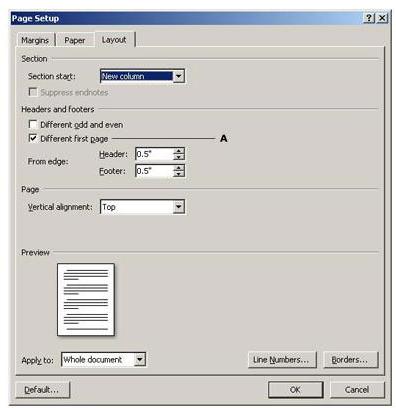
Why
is the "Different First Page" option used in the Page Setup dialog
box as shown in the given picture?
a. This
option allows you to remove the Page Breaks from the first page
b. This
option allows you to remove the Page Number from the first page
c. This
option allows you to remove the Section Breaks from the first page
d.
All of the above
Which
keyboard shortcut could be used to switch to Draft View?
a.
ALT+CTRL+P
b.
ALT+CTRL+O
c.
ALT+CTRL+N
d. None
of the above
Wednesday, 5 August 2015
MS Access 2007 Test
MS Access 2007 Test
Which
of the following table properties defines criteria to display only matching
rows in the Datasheet view?
a. SubdatasheetName
b. ValidationText
c. ValidationRule
d. Filter
How
do you create a report for a crosstab query if certain column values are
missing?
a. Set
the Value field in the crosstab
b. Set
the Column Heading field in the crosstab
c. Explicitly
set the Pivot list in the crosstab
The
Database Splitter is one of the database utilities. Which of the following is
true about the Database Splitter?
a. This
utility segregates the tables from the queries, forms, reports, macros,
modules, and shortcuts to the Data Access Pages
b. This
utility splits a Microsoft Access database into three files
c. This
utility breaks up the information in the tables into a compacted format for
faster retrieval
State
whether the following statement is true or false:
By
default, Access deletes the related data when records from a table are deleted.
a. True
b. False
How
do you customize the text on a form or report's window frame or tab?
a. TabIndex
Property
b. Text
Property
c. Form
Property
d. Caption
Property
By
using ADO or DAO, how can you fetch the records from a recordset?
a. By
using a For Loop with Next, without MoveNext, while checking for EOF
b. By
using a Do..Loop with MoveNext, while checking for EOF
c. By
using a While Loopwith Wend, while checking for EOF
Which
of the following clauses is not allowed in a sub-query?
a. is
Null
b. where
c. order
by
Which
of these functions determines if a phrase exists in a longer string?
a. InStr
b. Len
c. Trim
d. Left
How
many databases can be opened at one time in a single instance of Access 2007?
a. One
b. Two
c. Ten
d. Unlimited
This
question is based upon the figure shown below

What
is the function of the 'Single Step' tool in macros as shown in the picture?
a. When
the macro is run in this mode, each expression is saved one at a time
b. When
the macro is run in this mode, each action is performed one at a time
c. When
this option is clicked, all queries are saved in a single step
d. When
this option is clicked, all reports are saved in a single step
In a
report with grouping, how can you display the count of records in each group?
a. Add
a text box to the group's Footer section, and its control source to
"=Count(*)"
b. Set
the report's "Group Count" property to True
c. Add
a label to the group's Header section, and set the Caption property to
"Count Rows"
d. Add
a Summary control to the report's Footer section.
What
type of query do you use to modify existing records
a. Insert
query
b. Delete
query
c. Update
query
d. Select
query
State
whether true or false.
In
Access 2007, a Checkbox cannot be used as a calculated control
a. True
b. False
Out
of the following, which one can be used as a comparison operator?
a. &
b. >
c. ^
d. +
How
do you import a portion of an Excel spreadsheet into Access?
a. TransformXML
Method
b. ImportXML
Method
c. TransferSpreadsheet
Method
Which
textbox property determines that the text box is bound?
a. ControlSource
b. RowSource
c. RecordSource
d. FieldSource
Which
of the following functions returns an array, when a string is split using a
delimiter?
a. Str
function
b. String
function
c. StringParts
function
d. Split
function
Which
of the following is not done when you compact a database?
a. Restructuring
table records and objects, and then stores them in successive memory blocks.
b. Databases
linked to the compacted database are compacted and repaired.
c. Restores
table records into their primary key order, if a primary key exists in the
table
d. Reduces
the physical size of your database by making an exact duplicate of the
database.
Which
Text box property should be set to expand the text box to display the whole
text when there is too much text to be accommodated in the text box in Access
reports?
a. CanGrow
b. Reading
Order
c. Display
When
d. None
of the above
Which
of the following options clears a sort order without affecting the current
filter?
a. "Clear
All Sorts" button on the Home tab, in the Sort and Filter group.
b. "Unsort"
button on the Database Tools tab, in the Records group.
c. "Sorted"
button at the bottom of the Object window, next to the Record Navigator.
This
question is based upon the figure shown below

From
the figure, how would you filter the table to return only the students whose
last name begins with 'a', 'o', or 'y'?
a. Select
lastname from students where lastname like '[a,o, y]*'
b. Select
lastname from students where lastname like '*[a, o, y]'
c. Select
lastname from students where lastname not like '*[a, o, y]'
d. Select
lastname from students where lastname not like '[a,o, y]*'
e. Select
lastname from students where lastname='a' or lastname='o'or lastname='y'
Which
form property determines whether the current record has been modified since it
was last saved?
a. Cycle
property
b. Dirty
property
c. Filter
property
d. FilterOn
property
This
question is based upon the figure shown below

In
the given picture, a total is accumulated from record to record across a group.
Which feature has been used to achieve this result?
a. Cumulative
property
b. Totals
property
c. Running
sum property
d. None
of the above
Which
of the following is the easiest and fastest method to manipulate records on a
subform?
a. Using
a RecordsetType Property
b. Using
a RecordSetClone Property
c. Using
a RecordSelectors Property
d. Using
a References Property
Which
lookup field property determines the value from the RowSource that is stored in
the lookup column?
a. Column
Heads
b. Column
Widths
c. Column
Count
d. Bound
Column
Consider
the following tables:
Books
---------
BookId
BookName
AuthorId
SubjectId
PopularityRating (the Popularity of the book on a scale of 1
to 10)
Language (such as French, English, German etc)
What
is the query to determine Which German books (if any) are more popular than all
the French books?
a. Select
bookname from books where language='German' and popularityrating =(Select
popularityrating from books where language='French')
b. Select
bookname from books where language='German' and popularityrating > (Select
popularityrating from books where language='French')
c. Select
bookname from books where language='French' and popularityrating > (Select
max(popularityrating) from books where language='German')
d. Select
bookname from books where language='German' and popularityrating >(Select
max(popularityrating) from books where language='French')
What
is Option Explicit?
a. It
is a Database object
b. Requires
variable declarations
c. It
contains all of the data access pages that are currently open in a Microsoft
Access project
d. It
contains all open standard modules and class modules in a Microsoft Access
database
How
do you prevent a user from skipping the startup routines when opening an
application?
a. Set
the database's AllowBreakIntoCode property to False
b. Set
the database's AllowBypassKey property to False
c. Set
the database's AllowBuiltInToolbars property to False
d. Set
the database's StartupShowDBWindow property to False
Which
of the following is true about the Ribbon interface?
a. Ribbons
can be dragged and dropped to be on the side or the bottom of the screen.
b. Ribbons
can be minimized or collapsed
c. Ribbons
can be replaced with command bars
Which
datatype would be the most suitable to store a Hyperlink in a field of an
Access 2007 table?
a. char
b. varchar
c. hyperlink
d. nchar
You
want to create a table that includes a Description field. If you want to ensure
that the Description field accepts rich text formatting, which datatypes should
you use?
a. OLE
Object
b. Memo
c. Attachment
d. Text
This
question is based upon the figure shown below

Which
type of Control Layout does the given picture display?
a. Tabular
b. Stacked
c. Static
d. Tab
Which
of the following is not true regarding naming a file?
a. File
names are case sensitive
b. File
names can be up to 255 characters long including any file name extension
c. Either
uppercase or lowercase letters can be used in file names
d. Some
keyboard characters can cause unexpected results if used in file names
Which
of the given text field properties should you set in order to force a user to
enter a date value specifically in MM-DD-YYYY format?
a. Indexed
b. Limit
to List
c. Input
Mask
d. Allow
Value List Edits
How
can you tell if a report has no records to display or print?
a. NotInList
event is triggered
b. ApplyFilter
event is triggered
c. NoData
event is triggered
d. Filter
event is triggered
This
question is based upon the figure shown below

Refer
to the given picture and fill up the blank.
"Count
Values" are not available for fields of the _________ data type(s) while
using the Layout view.
a. Memo
b. OLE Object
c. Hyperlink
d. Memo,
OLE Object and Hyperlink
What
does an Access Data Projects (ADP) offer that an MDB/ACCDB doesn't?
a. It
can perform heterogeneous queries across a variety of data sources
b. It
is tied directly to one SQL Server database and can create and modify SQL
Server objects
c. It
supports temporary tables or links to other data sources beyond the single SQL
Server database
In
which of the following form sections is a Title control placed?
a. Detail
b. Form
Header
c. Page
Header
d. Page
Footer
How
do you start an Access application so that the user can't see or use the
Navigation Pane (or database container)?
a. Set
the Access Option to hide the navigation pane, and press CTRL+F11 special keys.
b. Set
the Access Option to hide the navigation pane, and press ALT+F1 special keys.
c. Set
the Access Option to hide the navigation pane, and turn off special keys to
prevent F11.
d. Set
the Access Option to hide the navigation pane, and press CTRL+G
special keys.
Choose
the appropriate Query for the Products table where data should be displayed
primarily in ascending order of the ProductGroup column. Secondary sorting
should be in the descending order of the CurrentStock column.
a. Select
* from Products order by CurrentStock,ProductGroup
b. Select
* from Products order by CurrentStock DESC,ProductGroup
c. Select
* from Products order by ProductGroup,CurrentStock
d. Select
* from Products order by ProductGroup,CurrentStock DESC
e. None
of the above